 Tekla 二次开发:ContourPlate API 完全解析 - 钢结构资源网 Tekla插件 CAD工具 犀牛GH汉化 套料


Tekla Structures ContourPlate API 完全解析
ContourPlate 是用于创建任意多边形轮廓板的核心类。通过指定一系列轮廓点(ContourPoint),结合截面和材质定义,即可在 Tekla 模型中生成具有特定厚度的板件。该类继承自 Part,提供了完整的创建、查询、修改和删除方法。
一、继承体系
ContourPlate 是一个密封类(sealed),无法被其他类继承。它的继承链如下:
[图1:ContourPlate 继承层次图]
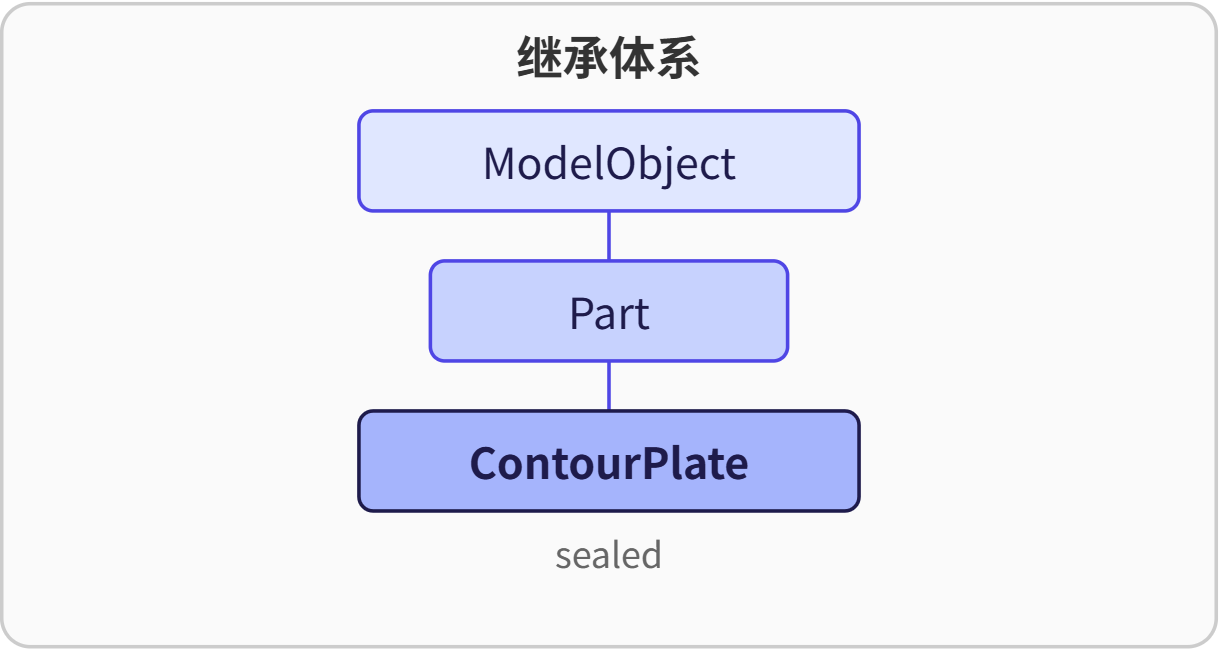
ContourPlate 直接继承了 Part 的所有几何与属性操作能力,并实现了 Insert、Select、Modify、Delete 等实体对象的生命周期方法。
二、构造函数
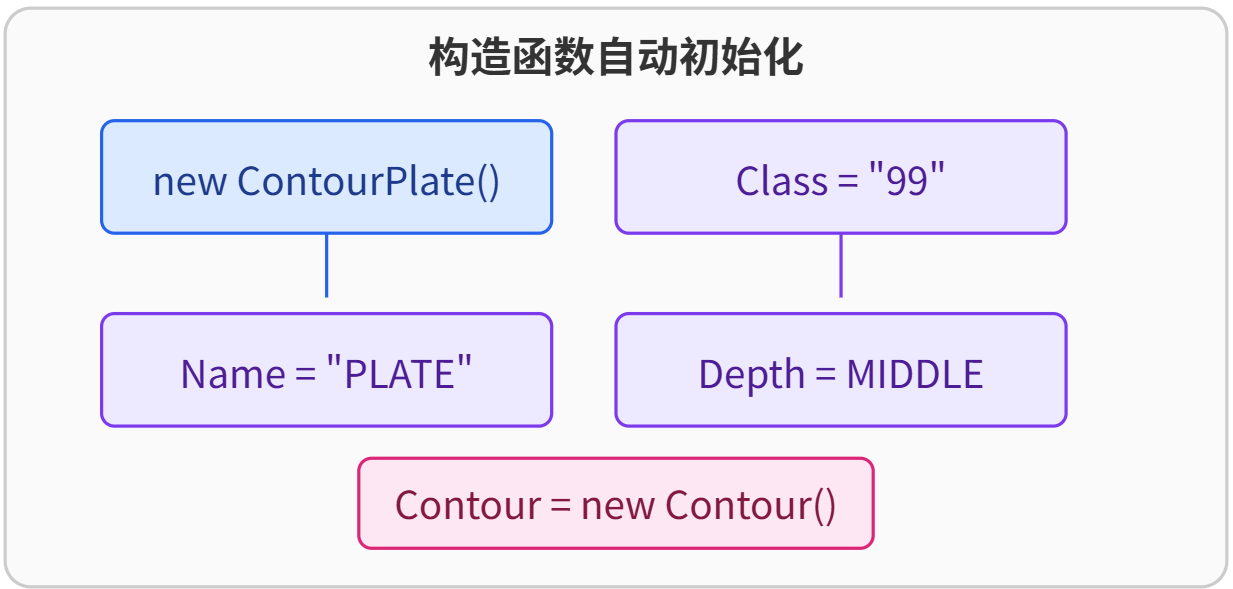
ContourPlate 仅提供一个无参构造函数。它在创建对象时自动完成基础初始化:
-
Class属性设置为"99" -
Name属性设置为"PLATE" -
Position.Depth设置为Position.DepthEnum.MIDDLE -
内部创建一个空的
Contour对象
典型的构造方式:
ContourPlate plate = new ContourPlate();
// 此时 plate.Contour 已初始化,但包含 0 个轮廓点
[图2:构造函数初始化流程]
三、属性
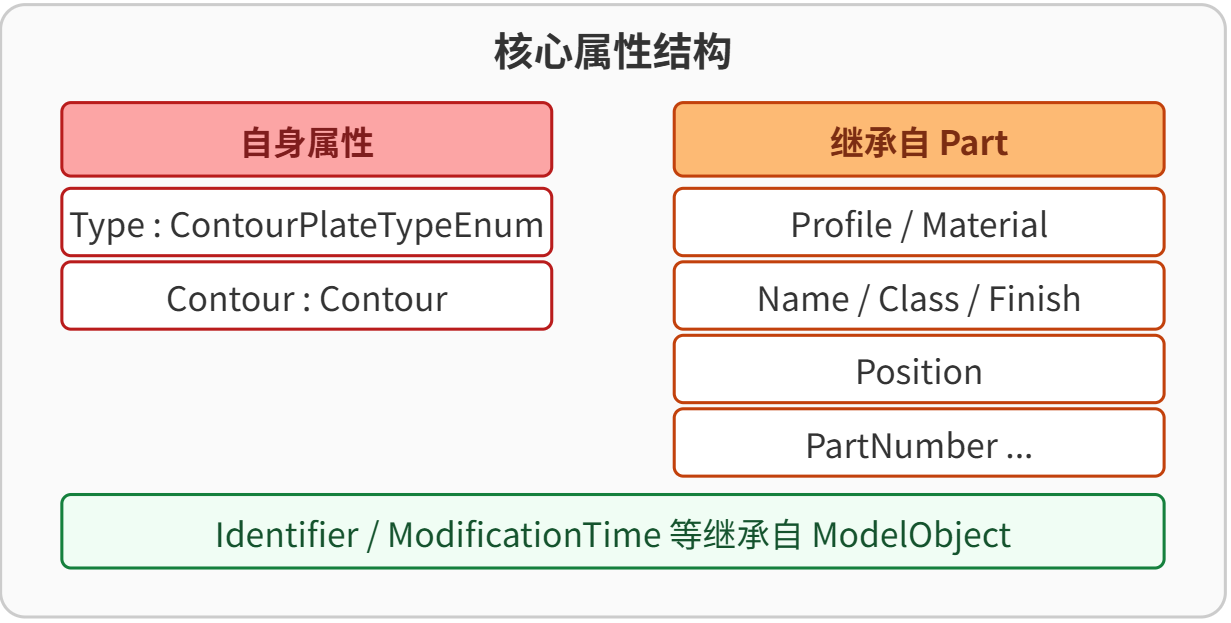
自身属性
| 属性 | 类型 | 说明 |
|---|---|---|
Type |
ContourPlateTypeEnum |
获取板的类型(只读)。值来自模型对象内部标记,无法通过代码直接设置。 |
Contour |
Contour |
获取或设置板的外轮廓。Contour 对象中包含一系列的 ContourPoint,定义板的平面形状。 |
继承自 Part / ModelObject 的属性
由于 ContourPlate 是 Part 的子类,它完整继承了零件类的所有常用属性。以下列出在实际开发中会被频繁使用的属性:
| 属性 | 类型 | 继承自 | 说明 |
|---|---|---|---|
Name |
string |
Part | 零件名称,如 "PLATE"。 |
Class |
string |
Part | 零件等级,用于过滤和分类,如 "99"。 |
Finish |
string |
Part | 表面处理代码,如 "FOO"。 |
PartNumber |
string |
Part | 零件编号。 |
AssemblyNumber |
string |
Part | 构件编号。 |
Profile |
Profile |
Part | 板的截面,通过 Profile.ProfileString 指定截面名称(如 "PL200")。 |
Material |
Material |
Part | 板的材质,通过 Material.MaterialString 指定材质名称(如 "Steel_Undefined")。 |
Position |
Position |
Part | 控制板在厚度方向上的位置(深度、平面、旋转)。 |
Identifier |
Identifier |
ModelObject | 模型对象的唯一标识符,在 Insert 后由系统分配。 |
ModificationTime |
DateTime |
ModelObject | 对象最后修改时间。 |
UserPhase |
int |
ModelObject | 用户定义的状态阶段。 |
注意:以上仅为最常用的属性,
Part与ModelObject还提供更多细节属性,如DeformingData、UserDefinedProperty等,可按需查阅 API 文档。此处不全部罗列,但实际开发中可按相同方式访问。
[图3:ContourPlate 核心属性结构]
四、枚举类型
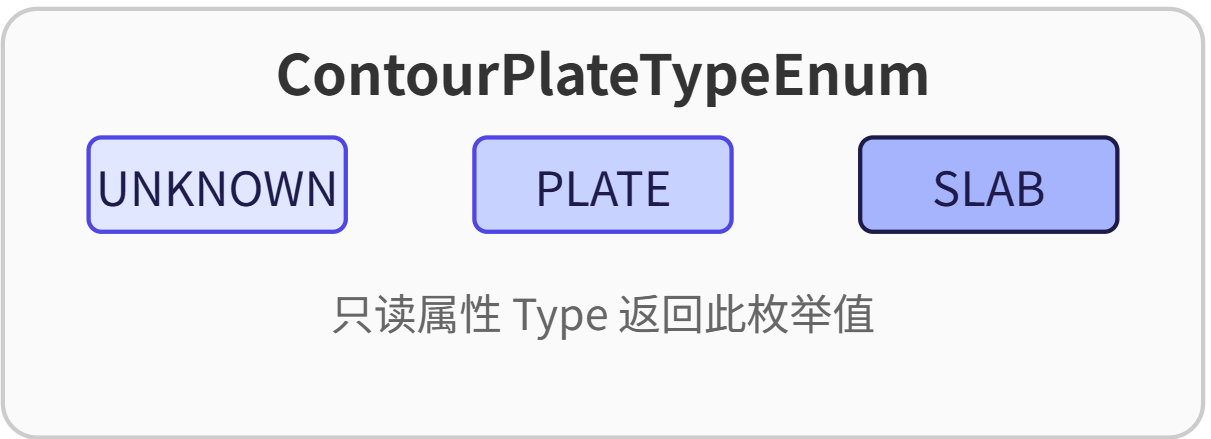
ContourPlateTypeEnum
指示轮廓板的子类型,在模型对象内部根据创建方式自动设定。
| 成员 | 值 | 说明 |
|---|---|---|
UNKNOWN |
0 | 未知类型。 |
PLATE |
1 | 标准轮廓板。 |
SLAB |
2 | 楼板类型的轮廓板。 |
枚举值通过只读属性 Type 获取,不能通过代码直接写入,它由 Tekla 结构内部管理。
[图4:ContourPlateTypeEnum 枚举结构]
五、方法
自身方法
| 方法 | 返回类型 | 说明 |
|---|---|---|
AddContourPoint(ContourPoint point) |
bool |
向轮廓中添加一个点。最多允许 99 个点,超出时返回 false。 |
Insert() |
bool |
重写基类方法,将轮廓板写入模型数据库。成功返回 true。 |
Select() |
bool |
重写基类方法,根据当前 Identifier 从模型中读取板的属性与轮廓数据。 |
Modify() |
bool |
重写基类方法,将修改后的板数据更新回模型。 |
Delete() |
bool |
重写基类方法,从模型中删除该轮廓板。 |
所有修改类方法(Select、Modify、Delete)在执行前都会检查 Identifier 的有效性,若标识符无效将抛出 ArgumentException。
继承方法
继承自 Part 和 ModelObject 的方法提供了丰富的几何查询、关系获取和用户定义属性操作能力。常用方法如下:
| 方法 | 返回类型 | 说明 |
|---|---|---|
GetSolid() |
Solid |
返回零件的三维实体几何。 |
GetBolts() |
List<BoltGroup> |
获取连接到此零件的螺栓组。 |
GetUserProperty(string name) |
double |
获取用户定义属性的值(双精度)。 |
SetUserProperty(string name, double value) |
bool |
设置用户定义属性。 |
GetReportProperty(string name) |
string |
获取报告属性(字符串)。 |
GetCenterLine() |
Line |
获取零件的中心线(对于板,可能返回空)。 |
GetPartMark() |
string |
获取零件标记。 |
Select() (ModelObject) |
bool |
基类选择方法,通常在派生类中重写。 |
这些方法在复杂逻辑(如检查碰撞、提取尺寸、批量属性修改)中极为常用。
[图5:ContourPlate 常用操作流程]
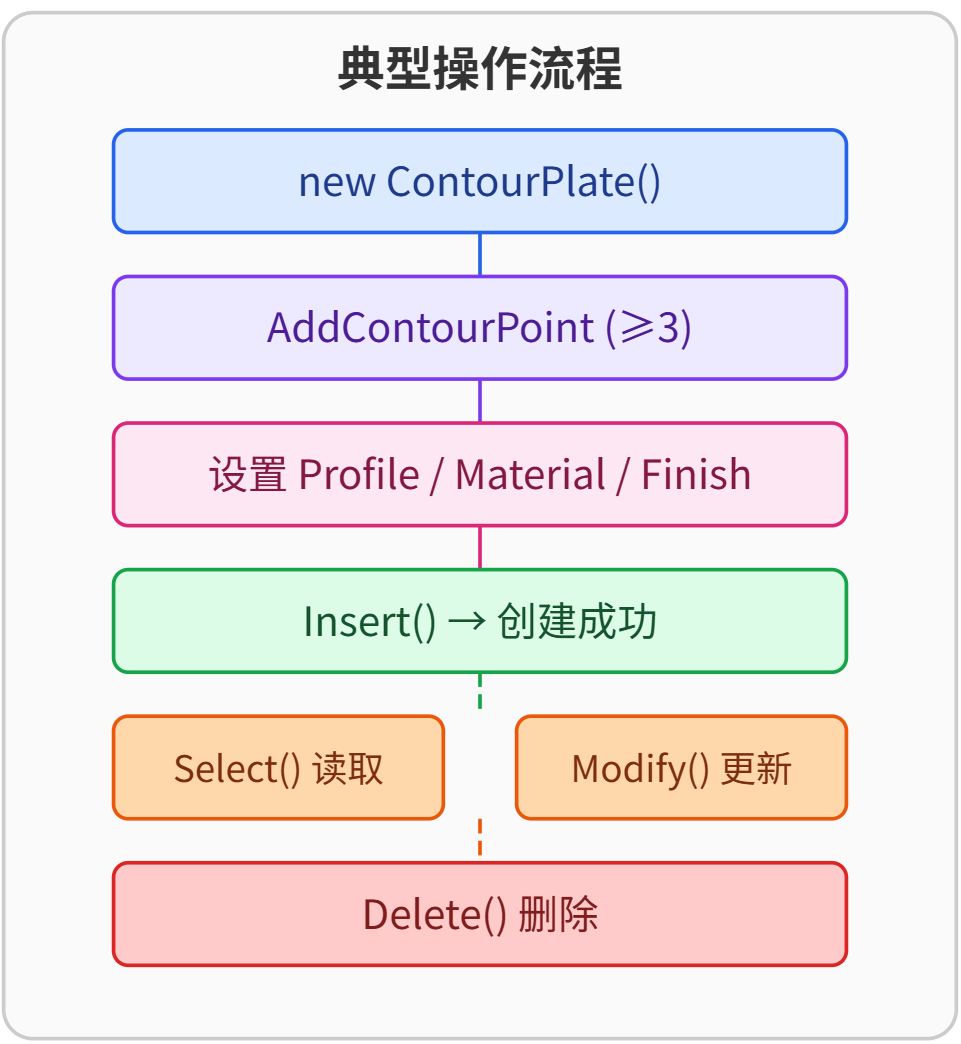
六、完整代码示例
示例1:创建一块三角形轮廓板
using Tekla.Structures.Model;
using Tekla.Structures.Geometry3d;

public void CreateTrianglePlate()
{
    // 1. 定义三个轮廓点
    ContourPoint pt1 = new ContourPoint(new Point(0, 4000, 0), null);
    ContourPoint pt2 = new ContourPoint(new Point(2000, 4000, 0), null);
    ContourPoint pt3 = new ContourPoint(new Point(0, 6000, 0), null);

    // 2. 创建 ContourPlate 对象
    ContourPlate plate = new ContourPlate();
    plate.AddContourPoint(pt1);
    plate.AddContourPoint(pt2);
    plate.AddContourPoint(pt3);

    // 3. 设置基本属性
    plate.Finish = "FOO";
    plate.Profile.ProfileString = "PL200";          // 厚度200mm
    plate.Material.MaterialString = "Steel_Undefined";

    // 4. 插入模型
    bool result = plate.Insert();
    if (result)
        Console.WriteLine("板创建成功,ID:" + plate.Identifier.ID);
    else
        Console.WriteLine("创建失败");
}
示例2:查询并修改已有轮廓板
using Tekla.Structures.Model;
using Tekla.Structures.Geometry3d;

public void ModifyExistingPlate(int plateId)
{
    ContourPlate plate = new ContourPlate();
    plate.Identifier.ID = plateId;

    // 1. 选中模型中的板,读取当前数据
    if (!plate.Select())
    {
        Console.WriteLine("未找到指定的板");
        return;
    }

    // 2. 修改表面处理
    plate.Finish = "BLAST";

    // 3. 修改第一个轮廓点的位置(示例:沿Y向偏移200mm)
    if (plate.Contour.ContourPoints.Count > 0)
    {
        ContourPoint firstPt = plate.Contour.ContourPoints[0];
        double y = firstPt.Y + 200.0;
        firstPt.SetPosition(new Point(firstPt.X, y, firstPt.Z));
    }

    // 4. 提交修改
    if (plate.Modify())
        Console.WriteLine("板修改成功");
    else
        Console.WriteLine("修改失败");
}
示例3:删除轮廓板
public void DeletePlate(int plateId)
{
    ContourPlate plate = new ContourPlate();
    plate.Identifier.ID = plateId;

    if (plate.Delete())
        Console.WriteLine("板已删除");
    else
        Console.WriteLine("删除失败,请检查ID是否存在");
}
示例4:遍历模型中的所有轮廓板
using Tekla.Structures.Model;
using System.Collections.Generic;

public void ListAllContourPlates()
{
    // 获取模型中的所有 ContourPlate 对象(需结合模型枚举器)
    ModelObjectEnumerator enumerator = new Model().GetModelObjectSelector()
        .GetAllObjectsWithType(ModelObjectEnum.CONTOURPLATE);

    while (enumerator.MoveNext())
    {
        ContourPlate plate = enumerator.Current as ContourPlate;
        if (plate != null)
        {
            Console.WriteLine($"ID: {plate.Identifier.ID}, 点数: {plate.Contour.ContourPoints.Count}");
        }
    }
}
七、常见问题与注意事项
-
轮廓点数量:必须至少为 3 个,且最多 99 个。少于 3 个点插入时,内部参数检查会抛出
ArgumentException,提示ContourPoints缺失。调用AddContourPoint时若已满 99 个点,会返回false。 -
必须设置的属性:
Profile(通过Profile.ProfileString设置截面)、Material和Contour(至少包含 3 个点)是插入模型的前提,否则将抛出异常提示缺失信息。 -
深度控制:默认构造函数将
Position.Depth设为MIDDLE,表示板厚居中。若要改变厚度方向偏移,需手动修改Position.Depth并调用Modify()。 -
枚举
Type只读:ContourPlateTypeEnum的值由系统根据建模方式自动确定,不能通过代码直接写入,修改Type无效。 -
Modify与Select的顺序:修改一个板之前必须确保对象拥有正确的Identifier。通常的做法是先new一个空对象并指定 ID,然后Select()获取最新数据,修改属性后再Modify()。 -
轮廓点顺序:轮廓点按添加顺序首尾相连形成闭合多边形,必须保证不自交,否则生成的实体可能异常。
-
坐标系:轮廓点坐标为模型全局坐标,Z 值决定板所在的高度平面,厚度方向沿板的局部坐标系 Z 轴。板件平面位于 X-Y 平面。
-
性能:频繁创建大量
ContourPlate时,建议在循环外复用Contour对象并及时调用Insert,避免不必要的内存分配。
[图6:轮廓点与坐标系关系]
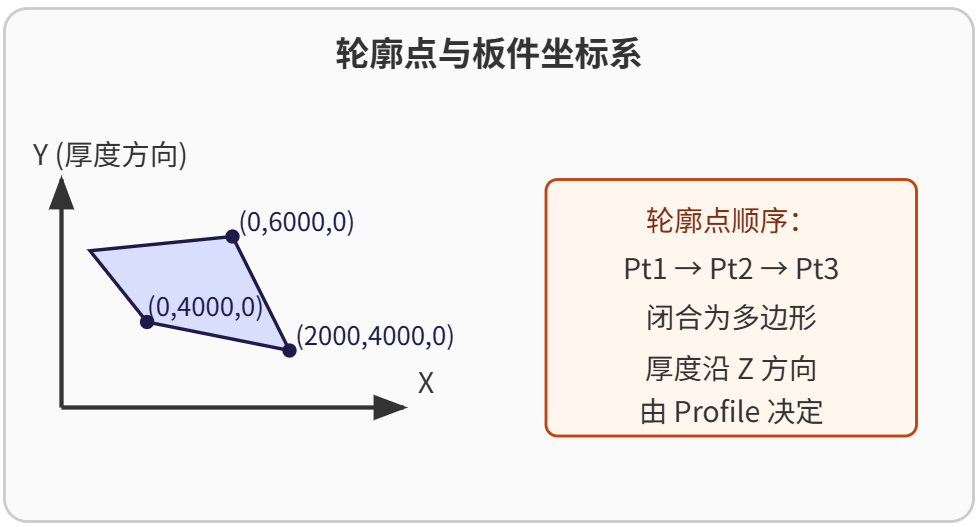
八、总结
-
ContourPlate是 Tekla Open API 中用于创建任意形状板件的核心类,继承自Part。 -
必须通过
AddContourPoint添加至少 3 个ContourPoint,并定义Profile和Material。 -
自身属性
Type和Contour直接反映板的结构信息,其中Type为只读枚举。 -
重写的
Insert、Select、Modify、Delete方法提供了完整的生命周期管理,使用前需确保Identifier有效。 -
继承自
Part和ModelObject的大量属性和方法使得板的几何查询、属性修改和关系获取非常便捷。 -
开发时应注意轮廓点数量限制、参数完整性检查,并正确理解坐标系与厚度方向。


 Tekla 模型自动保存工具
 Tekla高级工具箱(19~2021)
 Tekla多重格式转换工具v4.2
 GrasshopperTeklaLink中文帮助
 SSBIM for Tekla插件
 Tekla 二次开发:ModelObject API 完全解析
 TeklaPad(简易编程插件)


 zhang8fu
  2
2  TANGLEE
  zz
zz  yy100544
  laozhao
  不烦
不烦